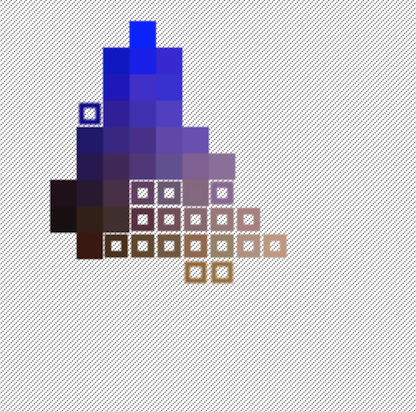
I was doing some experiments with clustering colors, and it turns out that RGB euclidean distance is woefully inadequate, so here’s a neat little visualization of the colors in an certain image (an obligatory cat) in L*a*b space (specifically the axes represent L* and a*).
So it turns out that comparing the difference between RGB colors is actually a really shitty way to determine color distance. There are colors which have similar RGB representations while being perceptually distant, and perceptually similar colors with vastly different representations.
So I decided to run a series of large scale double-blind (heh) experiments on human perception, analyzing the output with a dizzying array of statistical techniques and— oh wait, no I didn’t, because scientists have gotten that all figured out since the late ’70s.
That group of color scientists, the International Commission on Illumination (CIE, acronyms are a bit weird when they’re international, and by international, I mean French), have been working tirelessly since the early 20th century to create increasingly nuanced mathematical models of color perception.
Rather than give up and use tables (of a slightly different sort), they’ve elected to add increasingly nuanced corrections to the originally elegant euclidean distance metric. Somewhere on that trek, they’ve actually abandoned the notion of actually being a metric- the DeltaE function, which defines how to calculate the perceptual distance between any two colors, is actually only a quasimetric— that is, it isn’t guaranteed that the distance from a point A to a point B is the same as the distance from point B to point A.
I originally wrote this blog post to be parody of all the buzz over the discover of evidence for Alan Guth’s cosmic inflationary theory (hence the diagram), but I kind of waited a while for the content to ferment (albeit not the decades requisite to be worthy of a Nobel).
So here’s a little library for converting between L*a*b* and sRGB, as well as computing DeltaE. There’s probably stuff like configuring the white point that I haven’t adequately considered, but this was good enough for my purposes of filtering colors for Project Naptha.
I’m almost certainly an outsider, so I can’t speak for the gaming or VR communities, but to me the Facebook acquisition (and the Abrash onboarding announcement) signals that the new Oculus is more interested in bringing to fruition the Metaverse from Snow Crash, and that the hardware (Rift DK1, Crystal Cove, DK2, etc.) has been reduced to a mere means to attaining that end.
I think the “original” product was always contextualized as a gaming accessory, as the vested (financial, by virtue of Kickstarter) interest was held by gamers hoping to utilize this new form factor and experience.
I guess the question is what exactly is Oculus? In the beginning, I’d venture that the answer was simple. They were building a head mounted display which would be affordable, leveraging the technological improvements of the past decade (cheap high quality displays meant for phones and tablets, faster graphics cards). The hardware was their concern, and the software, the games and experiences, everyone else’s.
From the QuakeCon Abrash-Carmack-Luckey panel (which may be a bit dated), Carmack admits that he isn’t really interested in developing the hardware, as opposed to Luckey whose passion really lies in developing that hardware. Carmack, Abrash, and ultimately Facebook are alike in that they are software titans, which I think really shifts the balance in terms of the intentions for Oculus.
Sure there’s the hardware aspect, which is far from a solved problem. But given the palpable progress of Crystal Cove and the famed Valve prototypes, the end is nigh (to be less melodramatic, the consumer edition is on the brink of happening). But if you look at the teardowns, it’s a tablet screen, LEEP optics, an inertial measurement unit, and infrared tracker. The underlying display technology isn’t going to get better, because it’s already piggybacking off a much larger market where even Facebook’s considerable budget is a drop in the bucket.
I think since Carmack joined Luckey’s shop, the destiny of Oculus has shifted from producers of a mere display commodity to a more vertically integrated entity which develops both the hardware and the software which drives its progress and adoption (a la Apple).
And that accumulation of software talent is, I think, itself, a credible threat to the game developers hoping to build games for the Rift- because it establishes a first party, and that has the risk of pushing third party developers into the realm of the second class citizen.
But this dynamic of conflicted interest has played out several times before, and it is not usually an existential risk to the third parties. With transitions flipped, Microsoft had to deal with the risk of alienating OEMs when it started developing its own hardware- the Surface tablet. Likewise, Google’s decision to develop Nexus tablets and phones (and the acquisition of Motorola Mobility) was criticized because it would inevitably result in favoritism for its own devices, weakening relationships between LG, HTC, Samsung and the ilk.
The risk in stifling competition is inherent in any kind of move involving integration (horizontal, vertical, or 37 degrees counterclockwise), but on the other hand, this dissolution of the separation of interests enables the unimpeded progress toward a coherent vision.
And I think that coherent vision is to construct Virtual Reality that is truly grand, world-encompassing and liable to all the philosophical depth missing from prior incarnations outside of science fiction. Not the kind of gimmicky interactions retrofitted into first person shooters, jumping onto the bandwagon represented by that euphemistic initialism “VR”.
I don’t think post-acquisition institutional independence or agency ultimately matter, because the seeds for something larger has already been sown.
Is this new Oculus a threat to existing companies and their efforts to build VR games? Perhaps, this has to be true on some level, the more interesting question, I think, is whether or not this cost will be offset (and then some) by those inspired by Oculus’s vision and audacity and that which can be built on this new and boundless meta-platform.
..so I just finished writing all of this. I originally meant it as a Hacker News comment, and then halfway through I decided not to ultimately submit it, because if you really think about it, this is all kind of silly. I feel like one of those poor conspiracy theorists connecting dots where the lines may not exist. I’m sure there are nontrivial technical challenges that still need to be vanquished, but as an outside observer, I’d claim that Dunning-Kruger permeates my perception, and I can’t possibly gauge the extent of problems that remain (the less you know, the simpler it all seems). And I have a habit of conflating long term with short term (when I was 12, I vowed not to learn to drive, because surely, aeons from then, when I turned 16, the cars would no doubt drive themselves). I mean, I wrote all of this like five minutes ago, it can’t be that wrong already, right?
Work expands so as to fill the time available for its completion.
— Parkinson’s Law
For the past four or so months, I’ve been working on just one major project. It’s rather depressing to think that I built a reasonably impressive initial prototype over the course of about a dozen sleep-deprived hours, and that all I’ve accomplished since then is minor polish. Technically, there have been at least two rewrites, completely new capabilities and substantially improved technology, but none of that really matters when it comes to describing the project. A project is what it is, at 80% completion, at 95% and 99%.
Second semester at school has started, and that means that Pass/No Record isn’t a thing anymore, and everyone else is adjusting their behavior appropriately. Problem is, I haven’t changed. It turns out that an entire semester of racing toward the bottom is unsustainable when suddenly the floor has been adjusted to above your current position. But the more important point is that it’s leaving less time, and in particular, less contiguous time to work on anything.
Last month, I was working on a port of the Telea inpainting algorithm. Inpainting refers to any kind of image processing operation which attempts to intelligently fill in certain regions of an image with other content. Perhaps the most famous implementation of this is Photoshop’s Content Aware Fill feature, which uses a texture-synthesis and patch-based system, which enables them to copy over things like patterns, and textures, filling in vast contiguous regions of missing content. The problem is patch-based inpainting is almost always quite slow, in spite of its high quality results. There are simpler algorithms based on the Fast Marching Method like Telea or Navier-Stokes which use diffusion models and the ilk in order to propagate the solid colors of the bordering region of some inpainting mask inwards. I’ll write an actual blog post about this once I package it up and build a nifty demo for it.
Last year, Ben Kamens of Khan Academy posted about reverse engineering the flyout menu in Amazon, which suffered from the rather odd behavior of acting exactly how it should. You totally should be able to navigate to a submenu without worrying about accidentally mousing over something else. I looked around for a context menu library which could actually do this, but for some reason I couldn’t find one, so I decided to make my own.
I have a habit of writing blog posts in Sublime Text in lieu of legitimate READMEs. This project was simple and short enough that I think I did manage to write something with a passable semblance to a functional README before initiating this quest to craft a blog post.
This is hardly a project that I’d expect to go down in the annals of my blog as particularly interesting or notable. Instead, it’s a rather boring low-level computer sciencey thingy who would feel perfectly comfortable amidst homework assignments.
In fact, it’s virtually assured that documenting this endeavor– the combination of writing the words which comprise this post and the documentation already written on how to use this rather simple library– will inevitably consume more of my time than actual coding (people who are more familiar with highly intricate professional software tapestries may claim that such is merely the ideal and typical experience of a programmer).
Notice that I’ve managed to spend three paragraphs (well, my paragraphs are on the order of two sentences, so it doesn’t even qualify for the fourth-grade definition for what a paragraph is) talking about the uninteresting character of the project, its relative diminutive size, and the process of writing about the subject, without actually describing what exactly the project is. This, more than perhaps any other project of mine deserves such a diversion, for it is unlikely to yield “much amaze” or even a modest “such wow”.
It is a binary heap priority queue, a teensy bit shy of 50 lines, a mere kilobyte minified. It’s very loosely based off of Adam Hooper’s js-priority-queue but considerably smaller.
Now that I’ve gotten the actual informative and useful part of the blog post off my shoulders, I can take you along for the unproductive plunge into the rather lame backstory for the project. I was working on a port of the Teleainpainting algorithm and needed a priority queue, because the little incremental insertion sort that I hacked together in two lines was taking a few orders of magnitude longer than was acceptable.
With my considerable Google-Fu, I searched “javascript heap queue” and found js-priority-queue as well as PriorityQueue.js. They both happened to be implemented in CoffeeScript, which I love, except not really. I like the syntax, but creating a project using it usually involves setting up some compilation pipeline in order to get it to do the things that I want it to do. Overall, it’s a bit too much of a hassle for little projects.
I couldn’t actually find the source code for PriorityQueue.js so I settled for js-priority-queue. It was a bit annoying in that it required require.js to function and included several storage strategies that were totally useless. So I copied and pasted a few files together and stripped it of its AMD dependencies and created a somewhat dieted version.
But as 9th grade World History teaches us, appeasement never works, and this purely pragmatic minification leads inexorably to an irrational code golfing. At that point, I was overcome by this undeniable urge to cleanse it further, perhaps blinded by not-invented-here syndrome and software anorexia. Minutes later the file had been laid waste and in its place there existed its bare skeletal remains.
Now all I need to do is push it to github and write a blog post…
As with any minor stepping stone on the road to hell relentless trajectory of
Atwood’s Law, I probably don’t need to justify the existence of yet another “x, but now in Javascript!”, but I might as well try. After all, we all would like to think that there’s some ulterior motive to fulfilling that prophesy.
On tablet or other touchscreen devices- of which there are quite a number of nowadays (as the New Year’s Eve post, I am obliged to include conjecture about the technological zeitgeist), a library such as Ocrad.js might be used to add handwriting input in a device and operating system agnostic manner. Oftentimes, capturing the strokes and sending them over to a server to process might entail unacceptably high latency. Maybe you’re working on an offline-capable note-taking app, or a browser extension which indexes all the doge memes that you stumble upon while prowling the dark corners of the internet.
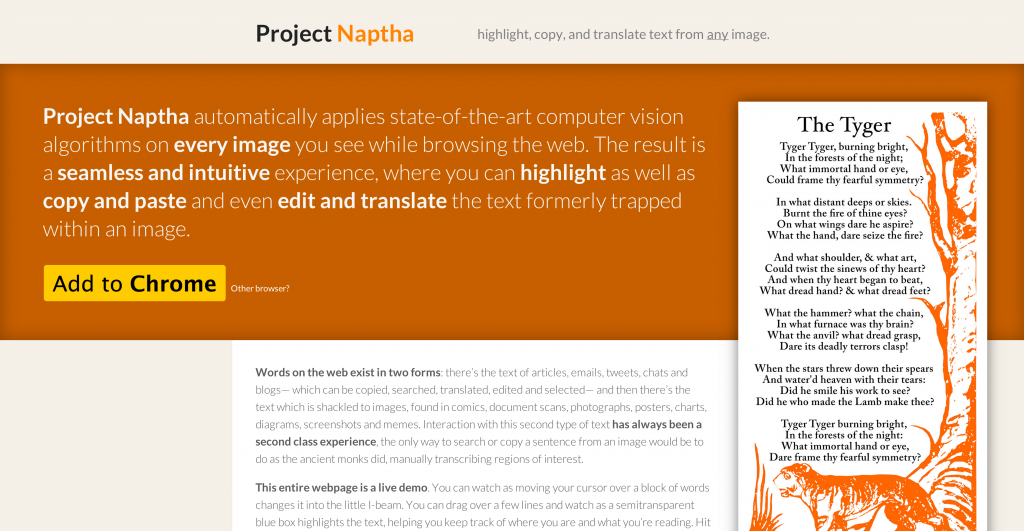
If you’ve been following my trail of blog posts recently, you’d probably be able to tell that I’ve been scrambling to finish the program that I prototyped many months ago overnight at a Hackathon. The idea of the extension was kind of simple and also kind of magical: a browser extension that allowed users to highlight, copy, and paste text from any image as if it were plain text. Of course the implementation is a bit difficult and actually relies on the advent of a number of newfangled technologies.
If you try to search for some open source text recognition engine, the first thing that comes up is Tesseract. That isn’t a mistake, because it turns out that the competition is worlds away in terms of accuracy. It’s actually pretty sad that the state of the art hasn’t progressed substantially since the mid-nineties.
A month ago, I tried compiling Tesseract using Emscripten. Perhaps it was a bad thing to try first, but soon I learned that even if it did work out, it probably wouldn’t have been practical anyway. I had figured that all OCR engines had been powered by artificial neural networks, support vector machines, k-nearest-neighbors and their machine learning kin. It turns out that this is hardly the norm except in the realm of the actually-accurate, whose open source provinces live under the protection of Lord Tesseract.
GOCR and Ocrad are essentially the only other open source OCR engines (there’s technically also Cuneiform, but the source code is in a really really big zip file from some website in Russian and its also really slow according to benchmarks). And something I didn’t realize until I had peered into the source code is that they are powered by (presumably) painstakingly written rules for each and every detectable glyph and variation. This kind of blew my mind.
Anyway, I tried to compile GOCR first and was immediately struck by how easy and painless it had been. I was on a roll, and decided to do Ocrad as well. It wasn’t particularly hard- sure it was slightly more involved but still hardly anything.
GOCR and Ocrad both only operate on NetPBM files (supporting other files is done in typical unix fashion by piping the outputs from programs that convert file formats). Nobody really uses NetPBM anymore, so in order to handle a typical use case, I’d need some means of converting from raw pixel values into the format. I Googled around for Javascript implementations of PBM/PGM/PNM, finding nothing. I opened the Wikipedia page on the format and was pleased to found out why: the format is dirt simple.
If you know me in person, you’ll probably know that I’m not a terribly decisive person. Oftentimes, I’ll delay the decision until there isn’t a choice left for me to make. Anyway, serially-indecisive-me strikes again, so I alternated between the development of GOCR.js and Ocrad.js, leading up to a simultaneous release.
But in the back of my mind, I knew that eventually I would have to pick one for building my image highlighting project. I had been leaning toward Ocrad the whole time because it seemed to be a bit faster and more accurate when it came to handwriting.
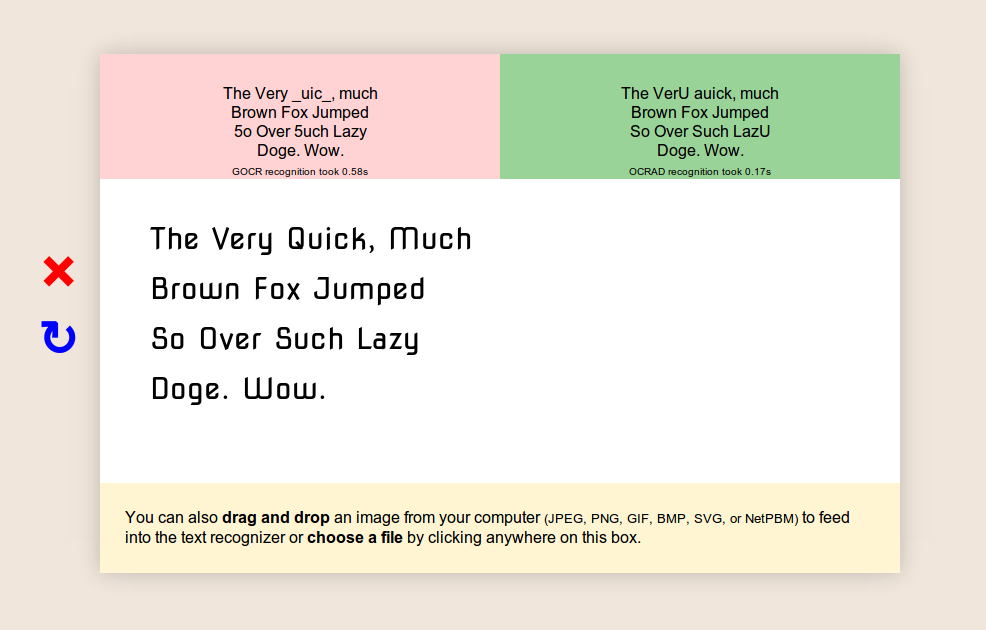
Anyway, I spent a while building the demo page. It’s pretty simple but I wouldn’t describe it as ugly. There’s a canvas in the center which can be drawn to in arbitrary fonts pulled via the Google Font API. There’s a neat little thing which lets you draw things on the canvas. And to round out the experience, you can run the OCR engine on your own images, by loading the image file onto canvas to support any file the browser does (JPG, GIF, BMP, WebP, PNG, SVG) or by directly feeding the engine in its native NetPBM formats.
What consistently amazes me about Optical Character Recognition isn’t its astonishing quality or lack thereof. Rather, it’s how utterly unpredictable the results can be. Sometimes there’ll be some barely legible block of text that comes through absolutely pristine, and some other time there will be a perfectly clean input which outputs complete garbage. Maybe this is a testament to the sheer difficulty of computer vision or the incredible and under-appreciated abilities of the human visual cortex.
At one point, I was talking to someone and I distinctly remembered (I know, all the best stories start this way) a sense of surprise when the person indicated that he had heard of Tesseract, the open source OCR engine. I had appraised it as somewhat more obscure than it evidently was. Some time later, I confided about the incident with a friend, and he said something along the lines of “OCR is one of those fields that everyone comes across once”.
I guess I’ve kind of held onto that thought for a while now, and it certainly seems to have at least a grain of truth. Text embedded into the physical world is more or less our primary means we have for communication and expression. Technology is about building tools that augment human capacity and inevitably entails supplanting some human capability. Data input is a huge bottleneck, and while we’re kind of sidestepping the problem with things like QR codes by bringing the digital world into the physical. OCR is just one of those fundamental enabling technologies which ought to be as broad in scope as the set of humans who have interacted with a keyboard.
I can’t help but feel that the rather large set of people who have interacted with the problem character recognition have surveyed the available tools and reached the same conclusion as your miniature Magic 8 Ball desk ornament: “Try again later”. It doesn’t take long for one to discover an instance of perfectly crisp and legible type which results in line noise of such entropy that it’d give DUAL_EC_DRBG a run for its money. “No, there really isn’t any way for this to be the state of the art.” “Well, I guess if it is, then maybe it’ll improve in a few years- technology improves quickly, right?”
You would think that some analogue of Linus’s Law would hold true: “given enough eyeballs, all bugs are shallow”- especially if you’re dealing with literal eyeballs reading letters. But incidentally, the engine that absolutely everyone uses was developed three decades ago (It’s older than I am!), abandoned for a decade before being acquired and released to the world (by our favorite benevolent overlords, Google).
In fact, what’s absolutely stunning is the sheer universality of Tesseract. Just about everything which claims to have text recognition as a feature is backed by it. At one point, I was hoping that Mathematica had some clever routine using morphology and symbolic new kinds of sciences and evolved automata pattern recognition. Nope! Nestled deep within the gigabytes of code lies the Chuck Testa of textadermies: Tesseract.
If the frequency of these progress reports is to say anything, it’s that I’m terrible at sticking to a schedule and even worse at estimating progress. I was hoping that I’d be able to use the Thanksgiving break in order to be productive and get ahead of my various projects– in particular, getting the text-detection and OCR extension to a state complete enough to publish.
For the past few days I’ve been playing with writing a minimal cryptocurrency which incorporates the central innovation of Bitcoin— the hashcash based transaction chain. It’s a simple enough concept that I could manage to implement the core functionality in about a hundred lines of Coffeescript.
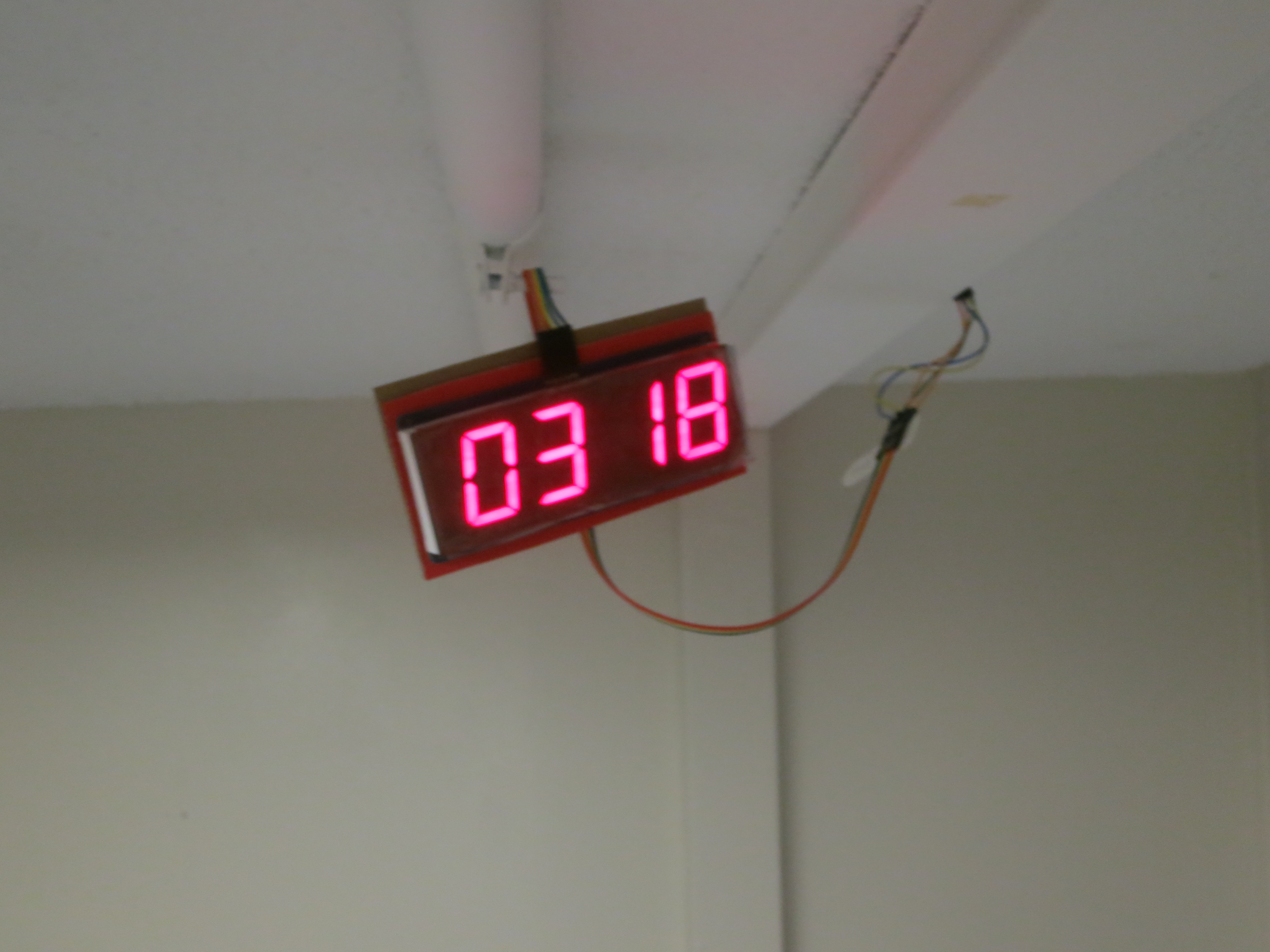
I’m also working on a cute little alarm clock which incorporates a pressure sensor underneath my bed in lieu of a snooze button. The goal is to use it as a framework for novel approaches to the tried and true problem of getting undergrads to wake up at ungodly hours (anything before noon). It’s powered by an Arduino and I2C ChronoDot and a large 7-segment display.
I’ve laid a little ethernet cable from the side of my bed, along the ceiling and to the door which contains a bunch of little EL wire inverter boxes (I’m smothering the transformers with Sugru in order to hopefully dampen the onset of my acoustically-induced insanity).
It’s Halloween, and I still haven’t posted a monthly blog post and I don’t quite feel like retroactively posting something next month. I’m understandably quite starved for free time with my attempts to reconcile sleep with college with social interaction- and from the looks of it, I probably won’t be able to publish the blog post that I’ve been working on for the better half of this month before it the month ends.
For the past five days, I’ve started using an actual laptop- a late-2013 Macbook Pro Retina 15″ (yes, I made it through the better part of two months of college without a laptop more sophisticated than a 2009-era Chromebook). Aside from the obligatory setup process and acclimation to the new operating system, and a mild bout of screen-size-anorexia (which with proper counseling, I’ve more or less recovered from- the 13″ is actually somewhat small, but I still can’t quite shake the feeling that 15″ is a smidgen too big), the process has been quite painless.
Getting a laptop slightly more capable than the Series 5 Chromebook (not the beefier Celeron model, the original Atom) is a quite long overdue change. I participated in my first hackathon (incidentally also the first time I’ve really written code since the start of the school year) during the beginning of the month. By the end of that 32-hour stretch, I did yearn for a functional trackpad, larger screen and more performant setup. But my shining knight in Unibody Aluminium armor would not have come until three weeks later. But I don’t think the productivity gains would have affected things too much- even with this dinky setup, the prototype scored the second place trophy.
The exact subject of the project was actually discussed briefly in the last progress update, on that long list of projects which I’ve yet to start. That night, I had actually taken the initiative to do a proper port of some Matlab implementation of the Stroke Width Transform. I hooked it up as a content script which would listen for mouse events over image elements and search for textual regions and draw semitransparent blue boxes where appropriate, and connected it to a node backend which would run tesseract to recognize characters. By the end of it all, I had enough for a pretty impressive demo.
Intermittently for more or less the entire month, I’ve been trying to improve the project- replacing some of the more hacky bits with more reliable implementations. I’ve read about some more algorithms, and experimented with different approaches to improve the method. I’m trying to add more stages to the text detection algorithm, such as the ability to segment an image into different lines, and improve the process of splitting lines into characters beyond mere connected components. But the process is rather tedious and with my limited free time, the project remains quite far away from public availability.
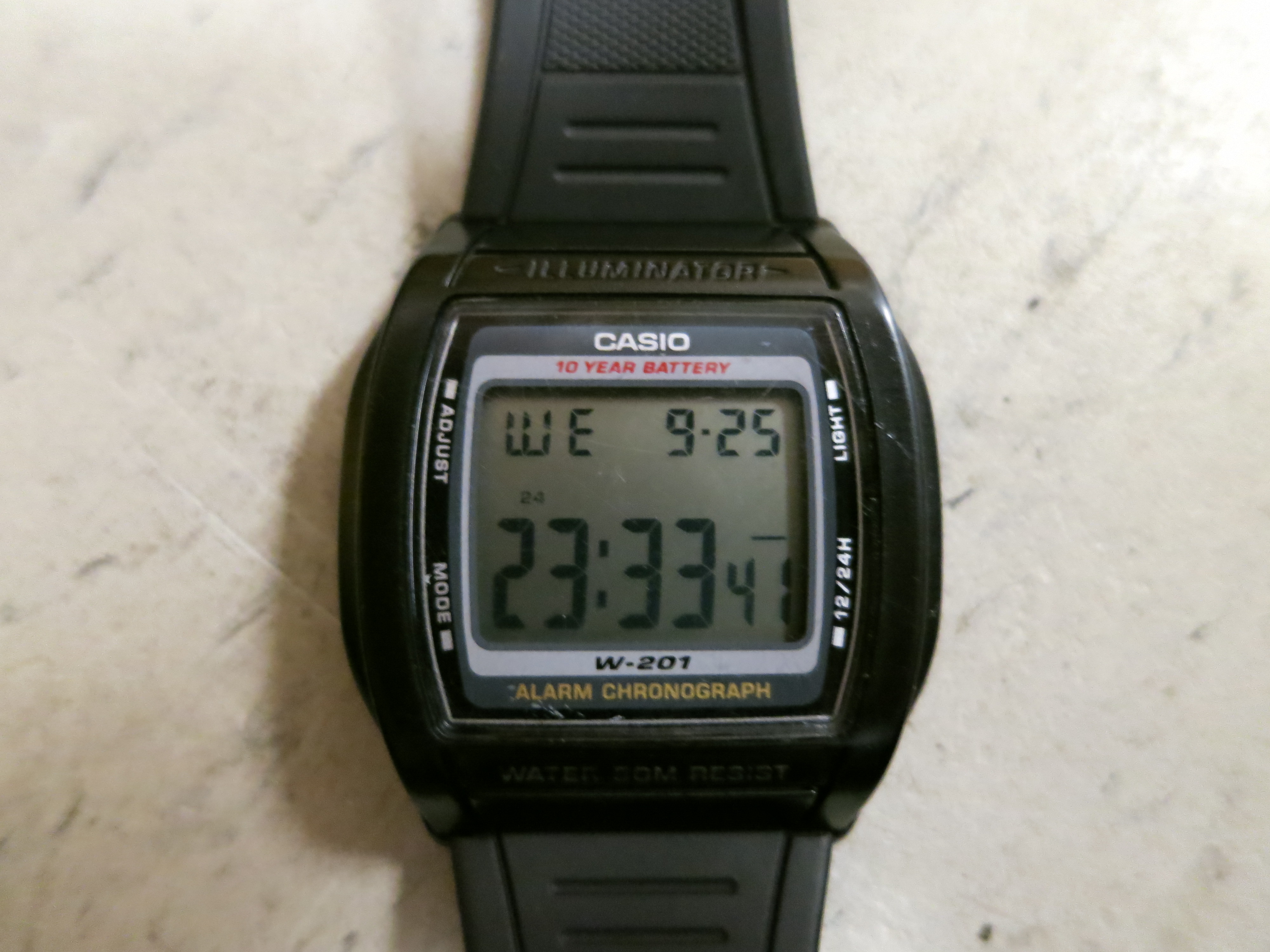
For the past four years, I’ve been using a Casio W-201 watch. It’s plastic and cheap and light, and there isn’t really much more I would ask for. I presume Douglas Adams would be rather disappointed by my fondness of digital watches, but I’m frankly just not smart enough to read an analog dial. I haven’t migrated to those fancy-schmancy smartwatches, and I don’t currently have any intention to part with my precious ticky thingy.
What’s ironic is that the one thing that annoys me about this watch is that sometimes it does, in fact, “tick”. It beeps, with the shrill piezoelectric sound that plagues anything with a four cent PCB. Whenever I switch its mode from military time to regular, or from clockface to stopwatch, I’m greeted by that hundred millisecond reminder that I have ears. And out of some odd sense of courtesy, or deep desire to be unnoticed, this really bothers me.
I may have been a tad disingenuous in saying that I’ve used the same watch for the past four years. Some time in the beginning of the span, I managed to lose my watch, and bought an exact replica. Well, it wasn’t quite the exact replica. The watch had the same model number, but the band that bore the Casio emblem seemed a different hue. Most irritatingly though, this replica made noises when the old one didn’t. At first I thought this was an edgy new feature that made things feel more responsive and tactile, but eventually I realized it was actually pretty annoying.
I distinctly recall the birth of a conspiracy- my subconscious irritation was percolating through neural pathways, assembling a notorious scheme to administer open-heart surgery on this diminutive timepiece to euthanize the noise, once and for all, under the noxious smother of a lead-tin alloy. But these fugitive fermentation of my mind took a backseat when I found my formerly missing watch limply lying on the edge of a basement table.
About a month ago, I had found myself in similar shoes. I had come onto campus with the sudden realization that my precious chronometer had vanished. I scoured the depths of the two pockets in my rather minimal backpack (I decided to pack light for senior year after lugging a monstrosity of a backpack for all of 11th grade), yet no plastic timekeeper was to be found.
Reluctantly, I located my contingency clock, and uneasily slid it onto my left wrist. But soon enough I had felt comfortable in the metaphorical transition of life which the watch represented. It’d be a new phase of my life, running at a different pace, in a new setting- I shouldn’t be encumbered by the gadgets of old.
They say all relationships suffer from a kind of honeymoon phase, where everything in the universe seems kept in perfect harmony. I celebrated my watch’s inaugural re-synchronization, meticulously ensuring that the deviation from NIST’s official US time was no more than a quarter-second. But as all quartz oscillators perceptively drift over time, my relationship with my lightless-sundial began to sour.
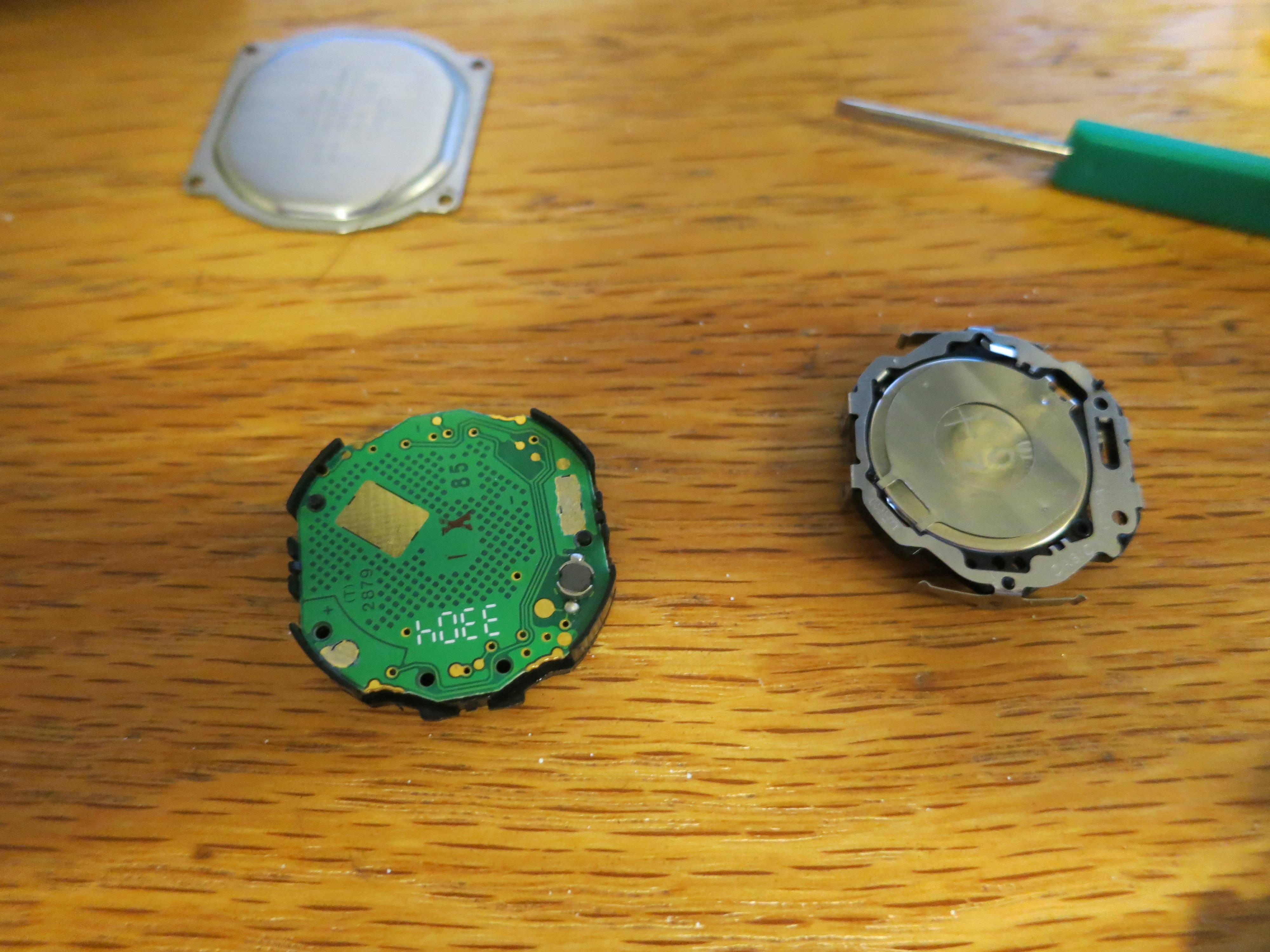
This edgy beeping noise began to perceptively evolve from neat to nuisance, and the long-lost scheme of silence started to surface. The final straw came when I had acquired a nifty petite set of mini-screwdrivers, ostensibly for eye-glass repair, courtesy of State Farm at the Career Fair. A particularly intractable case of post-midnight procrastination inevitably struck, leaving a desk strewn with digital watch-guts in its wake.
As I fumbled with how to trigger the precise reset code needed to get the watch to emerge from its disassembly-induced coma, I kept trying different permutations fitting some little spring in every nook and cranny I could find within the interior of the watch. As I haphazardly reassembled the watch, I noticed that the noise was gone, well, a rather significant caveat was that the screen would go black and the device would reset on every light flick of my wrist. From that, I realized that the spring must have been the connection between the ground and the piezoelectric buzzer- silencing the noise would be as simple as taking it out of the watch, rather than shoving it on top of the reset contact.
And as I began to appreciate the magnitude, or lack thereof, of insight gleaned from that epiphany, I came to realize the more protracted history of my first watch. When I had previously changed the battery on the original watch, I must have accidentally knocked out the most minuscule of springs, and simply overwritten the memories of the beep beforehand.
After all this time, the only thing that I had really wanted was to break something in the same way I had so many years prior. And I guess I might as well note as an epilogue that I found my original watch shortly thereafter while rifling through some cabinets. But I’ve embraced this new watch and all it symbolizes, perhaps ironically by physically handicapping it into the old one.
Recently, the American public has been forcefully made aware of the existence of various programs by the NSA- including massive infrastructure for intercepting all domestically routed communications to better protect us from imminent foreign threats. With legions of patriotic analysts, the NSA methodically ranks communications on the basis of their “foreignness” factor to determine candidacy for prolonged retention. Although it was developed with the best interests of the American people at heart, this program unwittingly ensnares communications of purely domestic nature on the order of tens of thousands of incidents per day. These innocent mistakes are putting the agency at a great risk because the 4th Amendment of the Constitution expressly prohibits such affronts to American privacy. Making determinations of foreignness is hard, but to prevent further inconvenience to the American way of life, we should take these leaks as an opportunity for us on the civilian front to aid the NSA by voluntarily indicating citizenship on all our networked communications.
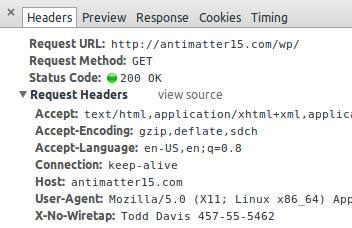
Here, we define the syntax and semantics of X-No-Wiretap, a HTTP header-based mechanism for indicating and proving citizenship to well-intentioned man-in-the-middle parties. It is inspired by the enormously successful RFC 3514 IPv4 Security Flag and HTTP DNT header.
Syntax
The HTTP header, “X-No-Wiretap” takes the value of the current user’s given name under penalty of perjury. The full name must be immediately followed by identity verification in the form of a standard U.S. Social Security Number, formatted with a hyphen “-” after every third and fifth digit.
Future revisions of the protocol may introduce additional forms of verification, as while the presence of an SSN should be able to lower the foreignness coefficient of the vast majority of domestic communications to well below 51%- initial research seems to indicate that the combination of full first name and SSN is able to reduce an associated message’s foreignness factor by over 76.8% for 99.997% of Americans. However, there is a chance that certain instances may additional require Passport, Driver’s License, Address, Birthdate, Mother’s Maiden Name, and Childhood Best Friend’s Name to further lower the foreignness factor. This capability will be addressed in future versions of the protocol.
What about SSL/TLS?
Of course adding encryption makes it substantially more difficult for the NSA to interpret the content of what a user is sending, and increases the chance that they may unwittingly collect and retain your communications. In order to address these concerns, this proposal necessarily deprecates all the SSL/TLS ciphers in favor of Double CAESAR’13, a thoroughly studied and well-known military-grade solution which offers excellent modes for graceful redegradation.
Isn’t it dangerous to send your social security number in plaintext along with every request?
Conventional security warns of the possibility of man-in-the-middle attacks, but these new intelligence revelations require entirely new types of cryptographic thinking. Here, the trusted entity is not the server acting at one end, it’s not even the user issuing the requests- but rather, it’s the bureaucracy sitting in the middle politely intercepting all traffic for benevolent analysis- protecting your way of life.
One may be tempted to characterize this as a sacrifice of privacy in order to optimize security, but this position is simply naive. Every new progressive initiative of the government advances both fronts- both security and liberty, never at the expense of either. If you take a holistic long term perspective on the impact on a global scale with a vast array of (classified) information sources, there is very little question that you too would arrive at the same conclusions on the genuine merits of this surveillance system.
In this case, the removal of encryption ensures that the government is able to parse the content of messages to identify terrorists. At the same time, the inclusion of the citizenship identification information should give citizens the safety of mind, knowing that their messages will not be stored indefinitely in a NSA datacenter.
What about Identity Theft?
What if you set up a server to transparently capture the browser headers? Any malicious entity could then collect all the social security numbers and real identities of everyone who happened to stumble onto their websites and use the information to sign up for credit cards, create hazardous investments, threaten or blackmail loved ones, and masquerade as a citizen while doing terrorist activities!
There isn’t any real evidence that such sweeping surveillance will even substantially reduce the chances of events that are intrinsically outliers anyway. On the other hand, identity theft is a real world issue which affects millions of Americans on a daily basis- and these changes will only make our real problems worse.
— Short-Sighted Critic
Our government has to reconcile with the fact that the flow of information has radically shifted in the past few decades- all the previous paradigms of privacy, security and adversaries have been obsoleted. Understandably, they need to create infrastructure to tackle this next generation of attacks. This could mean highly orchestrated attacks being planned online, and the government is justified in trying to exercise every available option to avert the next cyber-9/11. Our adversaries may have no limits to their capabilities, and so waiting for definitive evidence on the efficacy of counter-intelligence approaches is giving them an opportunity to plan their next attack.
When what’s at stake is the American way of life, it’s easy to put aside things that don’t really matter.
If the terrorists do find a way to cheat the foreignness heuristic, that’s not a problem, because this proposal is backwards compatible with the existing catch-all NSA policy. They can always, in the end, ignore the X-No-Wiretap header, but we wouldn’t know so it’d be okay.
When can I use this?
It’s expected that this proposal will breeze through the standardization process- because we as Americans can always get together and do that which must be done in these times which try men’s souls. Browsers should implement the feature as soon as possible, so that people can make use of the increased sense of security and privacy it affords.
If you’re truly eager to try it out, you can contribute to the prototype chrome extension which supports the header injection (the reversal of HTTPS Everywhere, a feature called HTTPS Nowhere hasn’t been implemented yet, but we’re accepting pull requests!). Since this extension is still experimental, inserting your personal identifiable information must be done by editing the source code, but you should expect a more user friendly interface in the next revision. Since it isn’t thoroughly tested, there may be a chance that it fails to leak the user’s personally identifiable information with every networked request, but rest assured this will be fixed as soon as the bugs are made aware to us.
We should all rally behind this proposal for a simple technical solution which will go a great length to simultaneously enhancing both privacy and security, while overall preserving the only thing which matters, our American way of life.